Error: Business Validation Error - Unexpected user error (-11622)
Last updated: March 12, 2026
Overview
This error occurs when attempting to sync an invoice to QuickBooks Online (QBO) and the process is blocked due to a customer-side setting. The full error message is:
Business Validation Error: Unexpected user error. (-11622)
This is caused by a setting within the customer's QBO profile that prevents updates via the API.
How to Fix It
To resolve this error:
Log into the customer's QuickBooks Online account.
Locate the customer profile associated with the error.
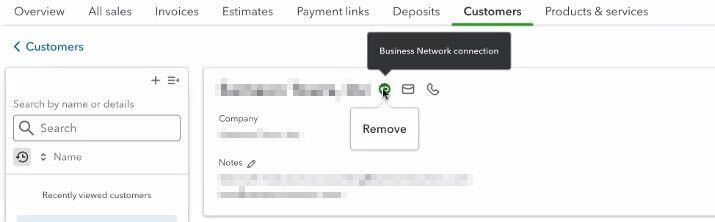
Check for a feature called "Business Network Connection."
This setting may be visible near the top of the customer profile, typically highlighted with a banner or message.Remove or disable the Business Network Connection, if possible.
This feature blocks any updates to the customer’s details from external sources, including through the API.
Once removed, attempt the invoice sync again.
Screenshot Example
FAQs and Troubleshooting Tips
What if the Business Network Connection can’t be removed?
The customer may need to contact QuickBooks support directly to request disconnection.Why does this setting cause sync failures?
QuickBooks Online restricts updates to customer records that are part of a business network to preserve integrity and avoid conflicts.
Need More Help?
If the error persists after disabling the Business Network Connection, reach out to the Luminous support team for additional troubleshooting.